Core Web Vitals Explained: LCP, INP and CLS in Plain English
Core Web Vitals are Google’s way of measuring how a web page feels to real visitors — how fast it loads, how quickly it responds, and whether the layout jumps around. They are part of Google’s page experience signals, and improving them makes your site better for every reader.
What Are Core Web Vitals?
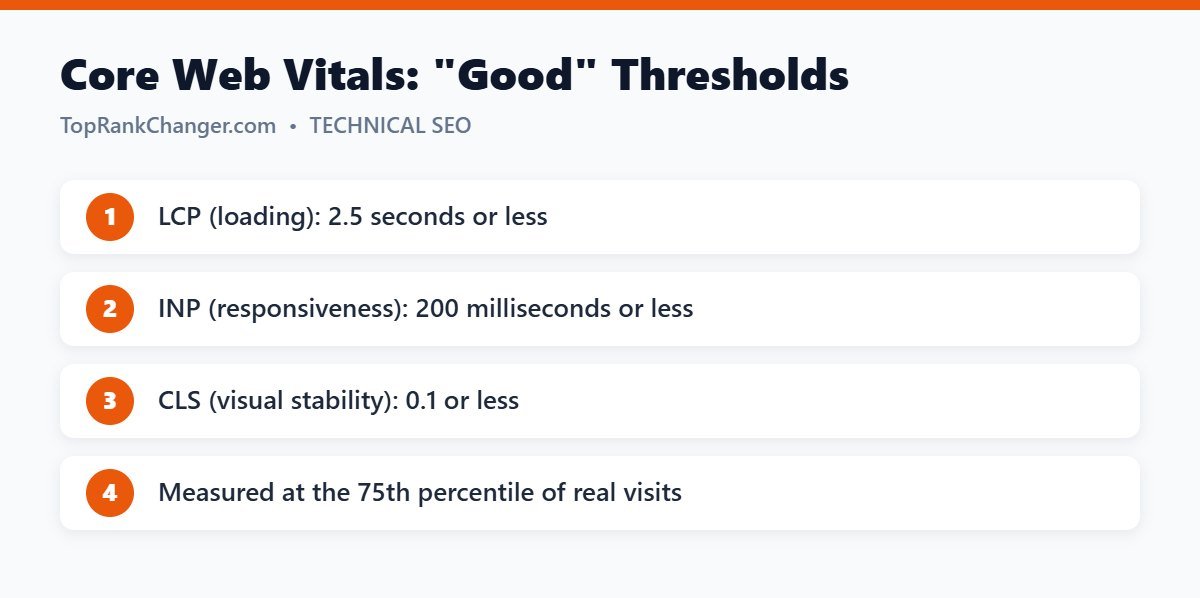
Core Web Vitals are three metrics that measure loading, interactivity and visual stability. Google evaluates them using real-user data from the Chrome User Experience Report, and a page “passes” when at least 75% of visits meet the “good” threshold.
1. Largest Contentful Paint (LCP)
What it measures: how long it takes for the largest visible element — usually a hero image, featured image or large block of text — to appear on screen.
Thresholds: good at 2.5 seconds or less; needs improvement up to 4 seconds; poor above 4 seconds.
How to improve LCP:
- Use fast, reliable hosting and a caching plugin.
- Compress and resize images; serve modern formats like WebP.
- Do not lazy-load the main image at the top of the page.
- Use a content delivery network (CDN).
- Reduce render-blocking CSS and JavaScript.
2. Interaction to Next Paint (INP)
What it measures: how quickly the page responds visually after a user interacts — taps a button, opens a menu or types in a field. INP replaced First Input Delay (FID) as a Core Web Vital in March 2024 because it measures responsiveness across the whole visit, not just the first interaction.
Thresholds: good at 200 milliseconds or less; needs improvement up to 500 ms; poor above 500 ms.
How to improve INP:
- Remove unnecessary plugins and third-party scripts.
- Delay non-essential JavaScript until after the page loads.
- Avoid heavy page builders on content pages when a lightweight theme will do.
- Limit the number of widgets, sliders and pop-ups.
3. Cumulative Layout Shift (CLS)
What it measures: how much the page content unexpectedly moves while loading. You have experienced poor CLS if you tried to tap a link and an image or ad suddenly pushed it down.
Thresholds: good at 0.1 or less; needs improvement up to 0.25; poor above 0.25.
How to improve CLS:
- Always set width and height attributes on images and videos (WordPress does this automatically for images added in the editor).
- Reserve space for ads and embeds so they do not push content.
- Avoid inserting banners or notices above existing content after the page loads.
- Use
font-display: swapand preload key fonts, or use system fonts.
How to Check Your Core Web Vitals
- Google Search Console – the Core Web Vitals report groups your URLs into good, needs improvement and poor, based on real-user data. It needs a certain amount of traffic to show results.
- PageSpeed Insights – enter any URL to see real-user field data (when available) plus a lab test with specific suggestions.
- Chrome DevTools / Lighthouse – useful for diagnosing problems while you make changes.
Field data vs. lab data: field data comes from real visitors and is what Google uses. Lab data is a simulated test. A great lab score is helpful, but always check the field data too.
How Much Do Core Web Vitals Affect Rankings?
Core Web Vitals are a ranking signal, but content relevance and quality matter far more. A slow page with the best answer can still outrank a fast page with a weak answer. Think of Core Web Vitals as a tie-breaker and, more importantly, as a way to keep visitors from leaving. Faster, stable pages tend to have lower bounce rates and more page views — which also matters for ad revenue.
Quick Wins for WordPress Sites
- Use a lightweight theme such as Kadence, GeneratePress or Astra.
- Install a caching plugin (LiteSpeed Cache if your host uses LiteSpeed servers).
- Optimize images on upload and convert to WebP.
- Remove plugins you do not use.
- Keep WordPress, the theme and plugins updated.
For a full walkthrough, see our guide on how to speed up a WordPress site.
Final Thoughts
Core Web Vitals turn “user experience” into numbers you can measure and improve. Aim for LCP under 2.5 seconds, INP under 200 milliseconds and CLS under 0.1, check Search Console regularly, and fix the biggest problems first.