How to Get Your Website Indexed by Google (and Fix Common Indexing Errors)
You published a great article, waited a week, searched for it on Google — and nothing. If your pages are not indexed, they cannot rank, no matter how good they are. This guide explains how to check whether Google has indexed your site and what to do when it has not.
What Does “Indexed” Mean?
A page is indexed when Google has crawled it, analyzed it and stored it in its search index. Only indexed pages can appear in search results. For a quick refresher on the full process, see how Google Search works.
How to Check If a Page Is Indexed
- URL Inspection tool in Google Search Console – paste the URL at the top of Search Console. It tells you whether the URL is on Google and why not if it isn’t.
- Page indexing report in Search Console – shows all indexed and non-indexed pages with reasons.
- site: search – search
site:yourdomain.comon Google for a rough overview.
Step 1: Set Up Google Search Console
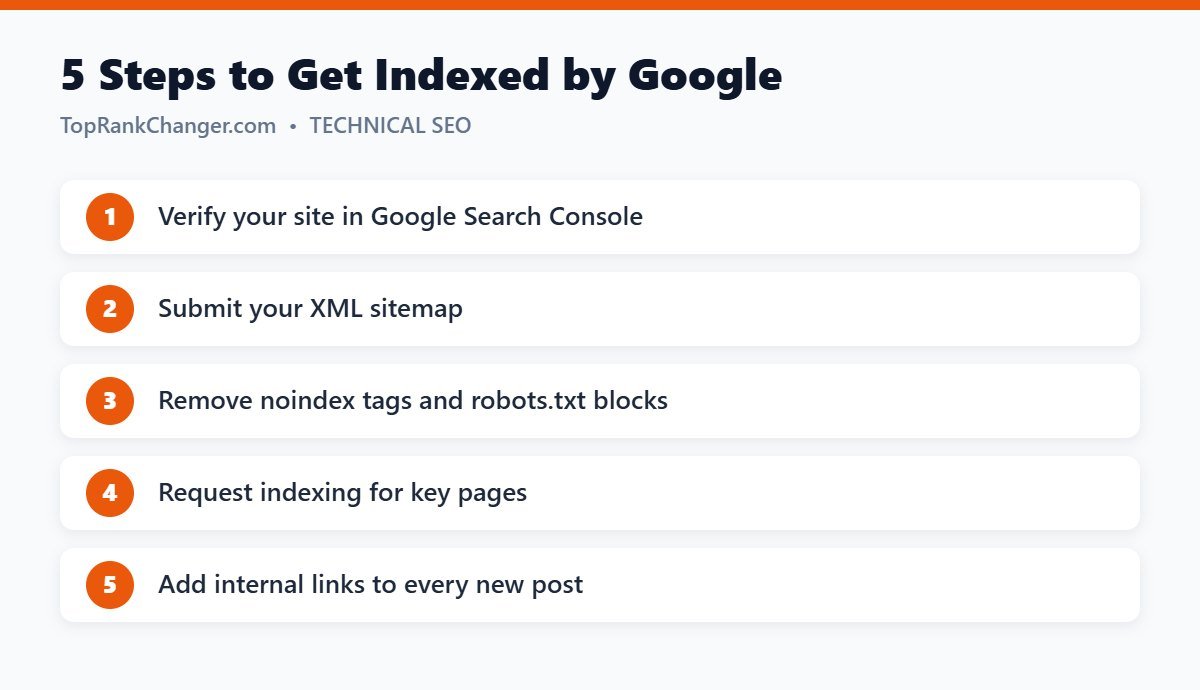
If you have not already, add your website to Google Search Console and verify ownership. The Domain property type (verified through DNS) covers all versions of your site, including www and non-www, http and https.
Step 2: Submit Your XML Sitemap
A sitemap lists the pages you want indexed. WordPress SEO plugins create one automatically — with Yoast SEO it is usually at /sitemap_index.xml. In Search Console go to Sitemaps, enter the sitemap URL and click Submit.
Step 3: Make Sure You Are Not Blocking Google
- In WordPress, go to Settings → Reading and make sure “Discourage search engines from indexing this site” is unchecked. This single checkbox is responsible for countless indexing problems.
- Check
yourdomain.com/robots.txtforDisallowrules that block important pages. - Make sure important pages do not have a
noindexsetting in your SEO plugin.
Step 4: Request Indexing for Important Pages
In the URL Inspection tool, after inspecting a URL, click Request Indexing. There is a daily limit, so use it for new or significantly updated important pages, not every page on your site. Requesting indexing does not guarantee it; it simply adds the page to Google’s crawl queue.
Step 5: Add Internal Links
Pages with no internal links are hard for Google to find and look unimportant. Link each new post from related articles and make sure it appears on category pages. Our internal linking guide shows a simple routine.
Understanding Common Indexing Statuses
“Discovered – currently not indexed”
Google knows the URL exists but has not crawled it yet. This is common on new sites. Improve internal linking, keep publishing quality content and give it time.
“Crawled – currently not indexed”
Google crawled the page but decided not to index it for now. This often signals that Google did not see enough value compared with pages already in its index. Improve the content: make it more complete, more original and more useful, add first-hand experience and merge thin, overlapping posts.
“Duplicate without user-selected canonical”
Google thinks the page is a duplicate of another URL and chose a different version. Make sure each page is unique and that canonical tags point to the right URL.
“Excluded by ‘noindex’ tag”
The page is telling Google not to index it. That is correct for things like tag archives or thank-you pages, but fix it if it appears on articles you want to rank.
“Page with redirect” / “Not found (404)”
Usually normal after changing URLs. Just make sure your sitemap and internal links point to the final, live URLs.
How Long Does Indexing Take?
On established sites, new posts can be indexed within hours. On brand-new sites it can take days or weeks. Consistent publishing, a clean site structure and a few quality backlinks all help Google crawl your site more often.
What Not to Do
- Don’t pay for “instant indexing” services that promise to force pages into Google.
- Don’t submit the same URL for indexing over and over.
- Don’t publish dozens of thin, near-identical pages hoping some stick.
Final Thoughts
Most indexing problems come down to a few causes: Google cannot find the page, is told not to index it, or does not think it adds enough value. Fix access issues first, then focus on internal links and genuinely useful content, and your pages will make it into the index.